If your team spends hours every week copying data between applications, following up with leads, sending repetitive emails, updating spreadsheets, creating reports, moving customer information between systems, or performing the same administrative tasks again and again, n8n automation can help.
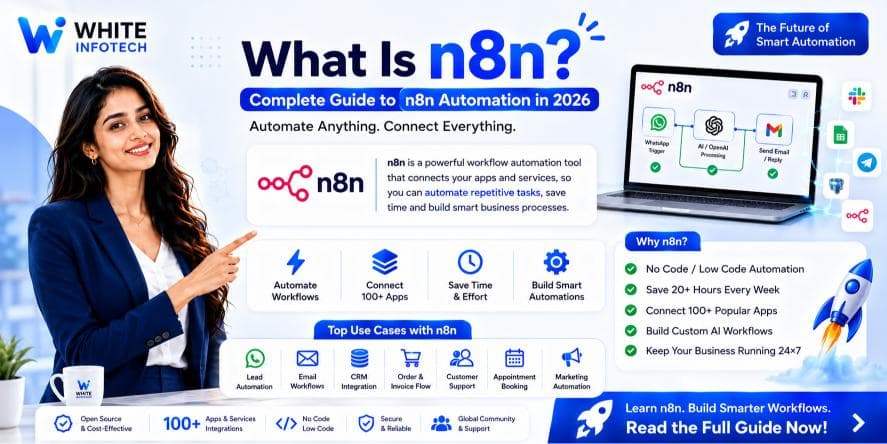
n8n is a workflow automation platform that lets businesses connect applications, APIs, databases, AI models, CRMs, communication tools, and internal systems into automated workflows.
Unlike simple automation tools that focus mainly on connecting one app to another, n8n combines visual workflow building with conditional logic, APIs, custom code, databases, AI agents, and human approval steps. That makes it useful for everything from simple marketing automation to complex business processes and AI-powered workflows.
This complete guide covers what n8n is, how it works, why businesses use it, its benefits and use cases, AI agents, integrations, Cloud vs self-hosted deployment, how it compares to Zapier and Make, and how to build your first workflow.
If you are looking for n8n automation services for your business, you can also work with an experienced automation partner.
What Is n8n?
n8n is a workflow automation platform that helps you connect different applications, services, APIs, databases, and business processes, and automate tasks between them.
In simple words:
n8n helps your software tools communicate with each other and perform repetitive business tasks automatically.
For example, imagine a customer fills out a form on your website.
Without automation, someone may need to:
- Check the form submission.
- Copy the customer's information.
- Add the lead to the CRM.
- Send a welcome email.
- Notify the sales team.
- Send a WhatsApp message.
- Create a follow-up task.
- Add the information to Google Sheets.
- Update a reporting dashboard.
With n8n workflow automation, these actions are connected into a single automated workflow:
Website Form → n8n → CRM → Email → WhatsApp → Sales Notification → Database → Reporting
Once configured correctly, the workflow executes automatically whenever a new lead arrives.
n8n describes itself as a workflow automation platform for connecting services and creating flexible workflows, with support for visual workflow design, integrations, code, and self-hosted deployment.
What Does n8n Stand For?
The name n8n is commonly understood as a shortened form of "nodemation."
The platform is built around nodes. Each node performs a specific action, such as:
- ✓Receive a webhook
- ✓Send an email
- ✓Read Google Sheets
- ✓Update a CRM
- ✓Call an API
- ✓Query a database
- ✓Process data
- ✓Run JavaScript
- ✓Use an AI model
- ✓Send a WhatsApp message
- ✓Create a task
- ✓Wait for a specific time
- ✓Check a condition
You connect these nodes together to create a workflow.
How Does n8n Work?
The easiest way to understand n8n is to think of it as a visual automation engine. A typical n8n workflow contains five parts.
1. Trigger
The trigger starts the workflow. Examples include:
- ✓Website form submission
- ✓New CRM lead
- ✓Incoming webhook
- ✓New email
- ✓Scheduled time
- ✓New database record
- ✓New Google Sheets row
- ✓Incoming WhatsApp event
- ✓Manual trigger
2. Data Processing
n8n receives and processes information — for example a name, email, phone number, and lead source captured from a Google Ads landing page. The workflow can clean, validate, format, filter, or transform this information.
3. Logic
You can add business rules. For example:
- ✓If lead value > ₹50,000 — notify the sales manager
- ✓If lead value < ₹50,000 — assign to a sales executive
This lets n8n automate genuinely complicated business processes rather than simply moving data from one application to another.
4. Action
The workflow performs an action:
- ✓Send an email
- ✓Update the CRM
- ✓Send a WhatsApp notification
- ✓Create an invoice
- ✓Add a task
- ✓Save information in a database
- ✓Generate an AI response
- ✓Send a Slack notification
5. Result
The final result is an automated business process that runs repeatedly without someone manually performing every step.
What Is an n8n Workflow?
An n8n workflow is a collection of connected nodes that performs a specific automated process. For example:
New Lead → Validate Lead → Check CRM → Create Contact → Assign Salesperson → Send WhatsApp → Send Email → Notify Manager
That entire process is one n8n workflow. Another example:
Schedule → Collect Website Data → AI Analysis → Generate Report → Save to Google Sheets → Email Report
The possibilities are broad because n8n can connect applications, APIs, databases, AI systems, and custom business logic. Its integration ecosystem includes thousands of available integrations across categories such as AI, marketing, sales, analytics, communication, databases, developer tools, and productivity.
Why Is n8n Popular in 2026?
Businesses are no longer looking only for basic task automation. They increasingly want automation that can:
- ✓Understand information
- ✓Make decisions
- ✓Work with APIs
- ✓Process documents
- ✓Connect internal systems
- ✓Use AI
- ✓Handle complex business logic
- ✓Trigger actions automatically
- ✓Keep humans involved when necessary
This is where n8n becomes interesting. It combines traditional workflow automation with AI capabilities, so businesses can build workflows that include AI models and AI agents alongside normal automation logic:
Customer Message → AI Understands Request → Check CRM → Retrieve Customer Information → Decide Response → Human Approval → Send Reply
That is considerably more advanced than simply sending an automated email.
What Is n8n AI Automation?
n8n AI automation means using artificial intelligence inside automated workflows. Instead of using AI as a standalone chatbot, businesses connect AI to real business systems:
Customer Email → AI Reads Email → Understands Intent → Searches CRM → Creates Ticket → Assigns Department → Sends Response
AI can be used for tasks such as text classification, document analysis, customer support, lead qualification, content generation, data extraction, summarisation, sentiment analysis, research, report generation, knowledge-base assistants, AI chatbots, and AI agents.
n8n supports AI agent workflows and provides integrations for AI models, tools, memory, vector stores, retrievers, and other AI components.
What Are n8n AI Agents?
An AI agent is a system that uses an AI model to interpret a task, make decisions, and use available tools to accomplish a goal. In n8n, an AI agent can be connected to tools and business systems.
Imagine a sales assistant. A customer asks: "Can you tell me the status of my order?" The AI agent could:
- Understand the question.
- Identify the customer.
- Search the CRM.
- Query the order database.
- Find the latest order status.
- Generate a response.
- Send the response through WhatsApp or another channel.
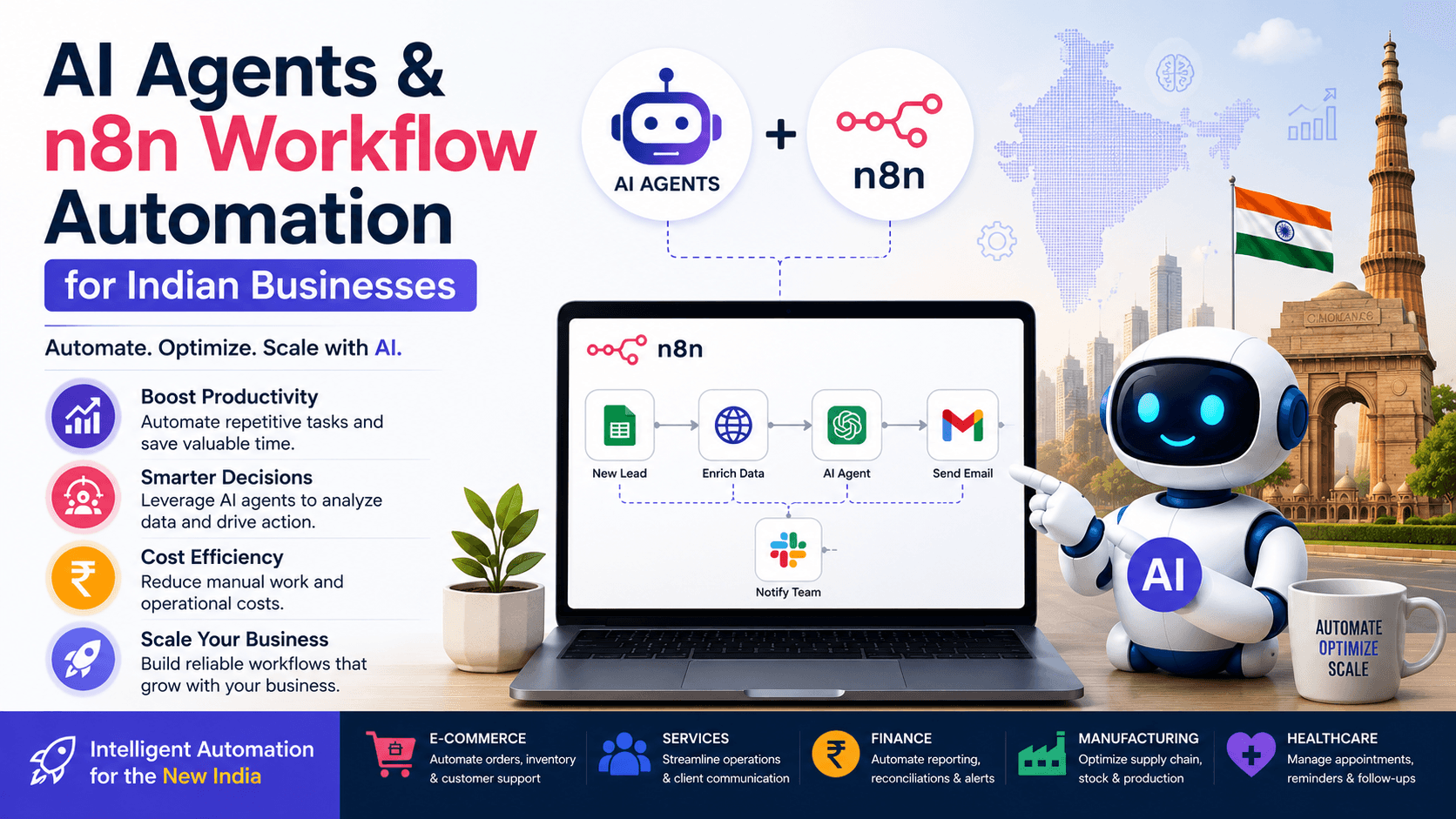
This is AI reasoning combined with workflow automation. n8n's AI capabilities include agent workflows, tool calling, RAG-style knowledge workflows, and integrations with many AI-related services. We cover this in more depth in our guide to AI agents and n8n workflow automation for Indian businesses.
Top Benefits of n8n Automation for Businesses
The biggest reason businesses adopt automation is not technology. It is the business outcome.
1. Save Time
Employees often spend significant amounts of time on repetitive tasks: copying customer information, sending repetitive emails, updating spreadsheets, creating reports, moving data between applications, assigning leads, and sending reminders.
Automation reduces the manual work these processes require, giving employees more time for sales, customers, strategy, and other high-value activities.
2. Reduce Human Errors
Manual data entry creates opportunities for mistakes. A person might enter the wrong email address, forget to update the CRM, miss a lead, send the wrong document, skip a follow-up, or type incorrect information into a spreadsheet.
Automated workflows execute predefined steps consistently, every time, at any hour. That consistency is the real gain — a workflow does not get distracted at 6 PM on a Friday.
Automation still needs testing, monitoring, validation, and error handling, though. It should not be built once and forgotten.
3. Faster Lead Response
Speed matters in sales. Imagine receiving 100 leads every day. A manual process requires someone to review every lead, enter it into the CRM, assign it, send a message, and notify the salesperson.
With automation, the same process happens within seconds:
New Lead → n8n → CRM → Lead Score → Salesperson Assignment → WhatsApp → Email → Follow-Up Task
This helps businesses respond faster while keeping the sales process organised.
4. Connect Different Business Applications
Most businesses use multiple software platforms — CRM, website, Google Sheets, accounting software, email, WhatsApp, ERP, helpdesk, databases, marketing tools, analytics, and AI platforms.
The problem is that these systems do not always communicate with each other automatically. n8n acts as an orchestration layer between them.
5. Reduce Operational Costs
Automation reduces the amount of repetitive manual work required. That does not necessarily mean replacing employees — it means employees spend less time on repetitive administration and more time on work that requires human judgment.
Instead of having an employee manually generate a daily report, n8n can collect data, process it, generate the report and send it. The employee then spends their time interpreting the results.
6. Improve Customer Experience
Customers expect fast responses. Automation helps businesses deliver faster notifications, faster lead responses, order updates, appointment reminders, support ticket routing, personalised messages, and follow-up reminders:
Order Created → n8n → Customer Notification → CRM Update → Internal Notification
The result is a more consistent customer journey.
7. Automate Complex Processes
One of the strongest advantages of n8n is that automation does not have to be a simple one-trigger-one-action process. You can build workflows with conditions, loops, multiple branches, API requests, databases, custom code, AI models, human approval, error handling, scheduled operations, webhooks, and sub-workflows.
That makes n8n suitable for genuinely advanced business process automation.
n8n Business Automation Use Cases
There are hundreds of possible use cases. Here are the most practical ones.
n8n for Sales Automation
A sales team can automate lead capture, lead qualification, lead assignment, CRM updates, follow-up reminders, sales notifications, email sequences, lead scoring, and customer data synchronisation:
Website Lead → n8n → Validate → CRM → Lead Score → Assign Salesperson → WhatsApp → Email → Follow-Up
n8n for Marketing Automation
Marketing teams use n8n to automate content workflows, lead nurturing, campaign reporting, social media processes, email marketing, customer segmentation, marketing analytics, SEO data collection, and competitor monitoring:
Google Search Console → n8n → Analyze Pages → AI → Identify Opportunities → Create Report
n8n for CRM Automation
CRM automation is another major use case. n8n helps synchronise customer data between systems:
Website → n8n → CRM → Google Sheets → Sales Notification
You can also automate contact creation, lead updates, customer segmentation, deal notifications, follow-ups, task creation, and customer status updates. This is particularly useful when a business keeps customer information in several systems at once — a problem a custom CRM with proper integrations is designed to solve.
n8n for WhatsApp Automation
Businesses can combine n8n with WhatsApp systems to automate customer communication: new lead notifications, appointment reminders, order notifications, customer support, sales follow-ups, payment reminders, and internal team alerts.
Website Form → n8n → CRM → WhatsApp Message → Sales Team Notification
Businesses should ensure their WhatsApp automation follows the applicable Meta policies, consent requirements, template rules, and messaging limits. See our guide to the WhatsApp Business API for the details.
n8n for Customer Support
Customer support teams can automate ticket workflows:
Customer Email → n8n → AI Classification → Identify Department → Create Ticket → Assign Agent → Notify Customer
AI can classify messages into categories such as billing, technical support, sales, refunds, complaints, or product information. Human agents remain involved for sensitive or complex cases.
n8n for Finance and Accounting
Finance teams can automate invoice processing, payment reminders, data synchronisation, expense notifications, report generation, document processing, and accounting system updates:
Invoice Received → Extract Data → Validate → Save → Notify Finance → Update System
AI-powered document extraction is particularly useful when invoices or documents contain semi-structured information.
n8n for HR
HR departments can automate candidate notifications, interview reminders, employee onboarding, document collection, HR notifications, leave workflows, and employee data synchronisation:
New Employee → Create Accounts → Send Welcome Email → Create Tasks → Notify HR → Add to Database
n8n for E-Commerce
E-commerce businesses can automate new order processing, customer notifications, inventory alerts, order updates, abandoned-cart workflows, customer segmentation, reporting, and product data synchronisation:
New Order → n8n → Update Inventory → CRM → Customer Notification → Internal Notification
Where inventory and order data live in an ERP, these workflows usually connect through the ERP's APIs.
n8n for Reporting and Business Intelligence
Many companies spend hours preparing reports. n8n can automate the collection and preparation of that information:
Schedule → Collect Data → Process Data → Calculate Metrics → Generate Report → Email Management
This works for sales reports, marketing reports, website reports, financial reports, operational reports, and customer reports — and pairs naturally with a proper business intelligence setup.
n8n for SEO Automation
n8n can automate parts of SEO workflows: keyword monitoring, Search Console data collection, SEO reporting, content research, competitor monitoring, technical SEO checks, content briefs, internal-link analysis, and AI-assisted content workflows.
A practical SEO workflow might look like:
Search Console → n8n → Identify Low-CTR Pages → Analyze Keywords → AI Suggestions → Create SEO Report
The important point is that automation should support SEO strategy rather than produce large amounts of low-quality AI content.
n8n for AI Content Automation
Content teams can build workflows such as:
Topic → Research → AI Draft → Human Review → CMS → Social Media → Email Newsletter
Add approval stages so content is never published without review. This is especially useful for businesses producing content at scale.
n8n Integrations
One of n8n's biggest advantages is its ability to connect different tools. The integration directory covers a broad range of categories, including AI, analytics, communication, data storage, developer tools, marketing, sales, and productivity.
Common categories include:
- ✓Google Workspace
- ✓CRMs
- ✓Databases
- ✓Email platforms
- ✓Communication platforms
- ✓Marketing tools
- ✓AI models
- ✓Cloud services
- ✓Project management tools
- ✓Analytics platforms
- ✓E-commerce platforms
- ✓APIs and webhooks
The important capability is not simply the number of integrations. It is the ability to combine multiple systems in one workflow.
n8n and APIs
APIs are one of the reasons n8n is powerful for technical teams. If a business application has an API, n8n can usually interact with it using HTTP requests or dedicated integrations:
CRM API → n8n → Data Processing → ERP API
or:
Website API → n8n → AI API → Database
This means businesses are not limited to applications that happen to have a pre-built connector.
n8n Cloud vs Self-Hosted n8n
One common question is whether to use n8n Cloud or self-host n8n. There are two broad approaches.
n8n Cloud
With n8n Cloud, the infrastructure is hosted for you. This is easier for businesses that want to focus on building workflows instead of managing servers. Benefits include easier setup, managed infrastructure, faster deployment, less server maintenance, and easier access for teams.
n8n's Cloud plans include Starter, Pro, and Enterprise options, with features varying by plan.
Self-Hosted n8n
With self-hosting, your organisation runs n8n on its own infrastructure or hosting environment. This provides more control over infrastructure, deployment, the data environment, networking, customisation, and scaling architecture.
However, self-hosting also means you manage servers, security, backups, updates, monitoring, reliability, credentials, and scaling yourself.
n8n also offers a self-hosted Business plan for growing teams, including features such as Git version control, SSO, environments, and queue-mode scaling.
Which Should You Choose?
Choose n8n Cloud if you want a simpler managed experience. Choose self-hosted n8n if your organisation needs greater infrastructure control and has the technical capability to manage the environment.
For larger or more complex deployments, evaluate security, compliance, workload volume, integrations, maintenance, and internal technical resources before deciding.
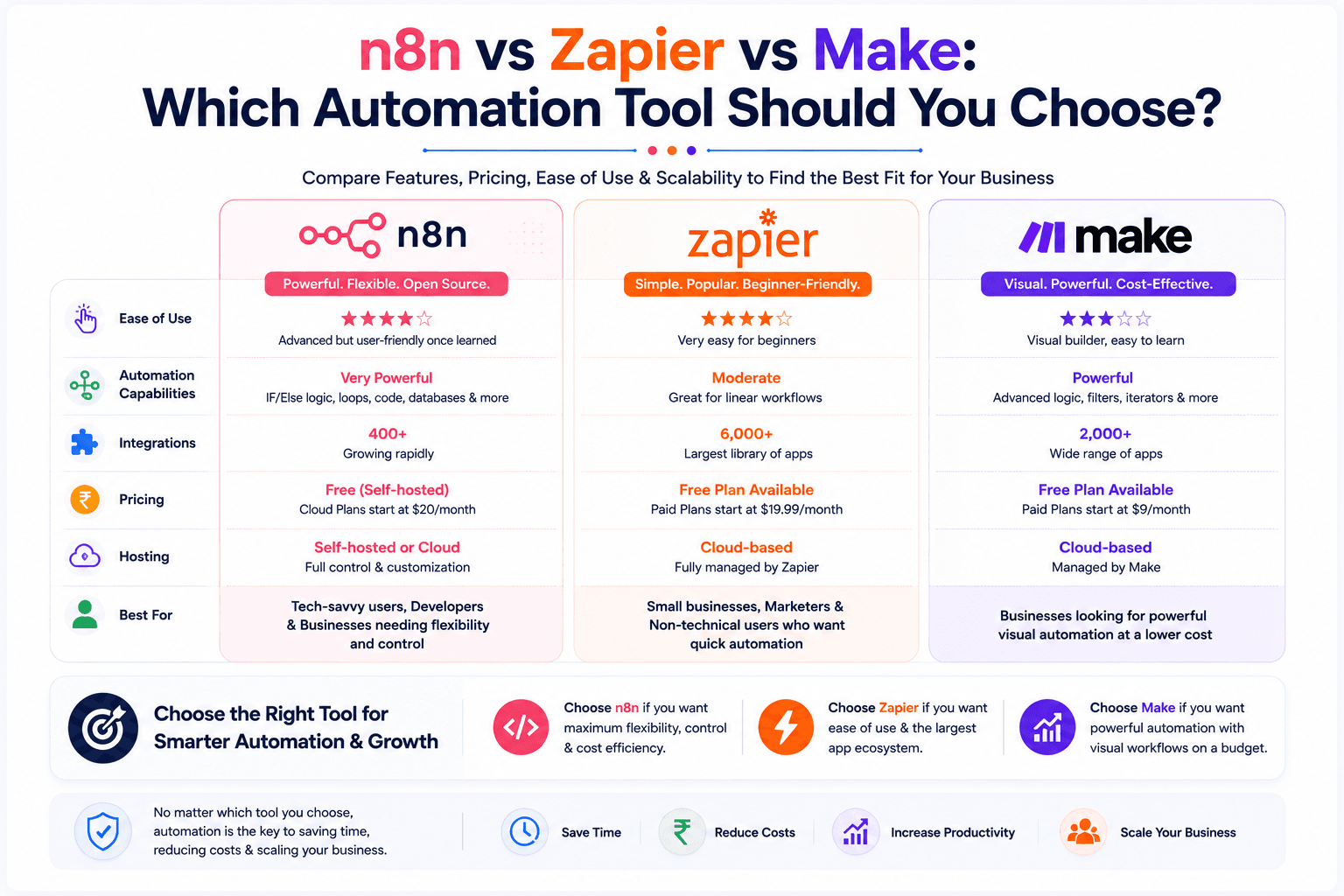
n8n vs Zapier
One of the most common searches is "n8n vs Zapier: which is better?" The answer depends on your requirements.
Zapier is often attractive for simple automation, quick setup, non-technical users, and basic app-to-app workflows.
n8n is attractive for complex workflows, API-heavy automation, custom logic, AI workflows, developer-friendly automation, self-hosting, advanced data processing, database workflows, and custom code.
If your workflow is Form → Email, almost any automation platform is sufficient. But if your workflow is:
Webhook → Validate Data → CRM → Database → API → AI → Conditional Logic → Human Approval → WhatsApp → Reporting
a more flexible workflow automation platform is the better fit.
n8n vs Make
n8n and Make are both popular automation platforms. Make is known for its visual automation interface and broad integration ecosystem.
n8n is especially attractive when you need more technical control, custom APIs, code, self-hosting, complex workflows, AI agents, advanced logic, and developer-oriented customisation.
The best choice depends on your business process, technical team, security requirements, budget, and preferred deployment model. Instead of asking "which platform is universally better?", ask: which platform fits our workflow architecture?
For a detailed side-by-side breakdown, read our full comparison: n8n vs Zapier vs Make.
Is n8n Free?
n8n has different deployment and commercial options, so the answer depends on how you use it. There are self-hosted options as well as hosted Cloud plans, and its pricing model has evolved — n8n has moved toward execution-based scaling rather than limiting the number of active workflows, while a Community Edition remains available.
Because pricing and plan features change, check the current official n8n pricing page before making a purchasing decision.
How Much Can n8n Automation Save a Business?
There is no universal number. The savings depend on the number of employees, number of repetitive tasks, task frequency, average task duration, error rate, number of customers and leads, integration complexity, and workflow volume.
A simple calculation helps. Suppose 10 employees each spend 1 hour per day on a repetitive process. That equals 10 hours per day, and over roughly 22 working days:
10 × 22 = 220 hours per month
If automation removes most of that repetitive work, the business recovers a substantial amount of employee time.
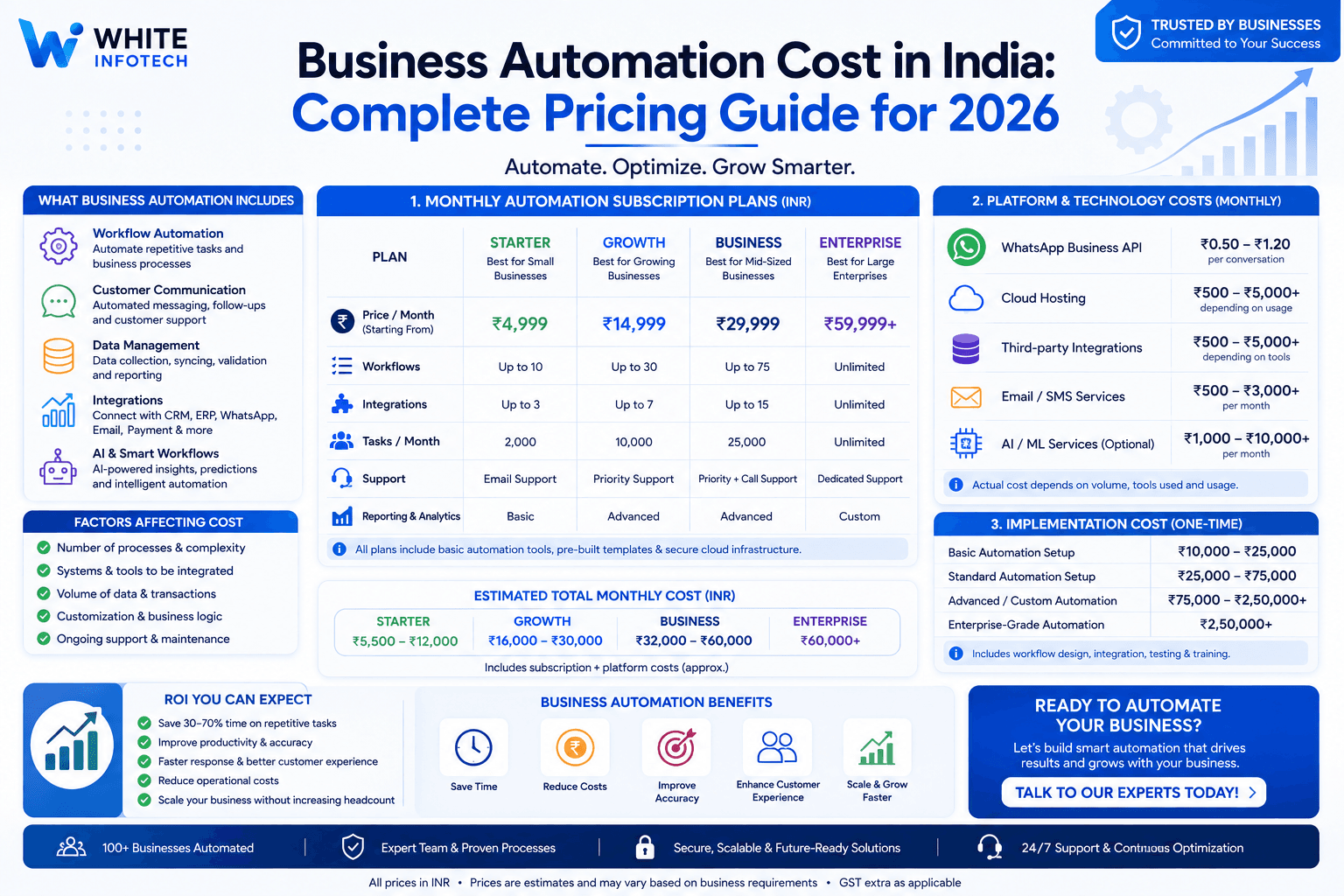
A realistic ROI calculation should also account for automation development cost, software costs, hosting, maintenance, API costs, AI model costs, monitoring, and error handling. For India-specific numbers, see our business automation cost guide.
The goal should not be "automate everything." The goal is to automate the right processes with measurable business value.
How to Identify What Your Business Should Automate
Before building an n8n workflow, list your repetitive processes and look for tasks that are:
- ✓Repetitive — the same steps happen every day or every week
- ✓Rule-based — the process follows predictable business rules
- ✓Data-heavy — employees repeatedly move information between systems
- ✓Time-consuming — the process takes significant employee time
- ✓Error-prone — manual work frequently creates mistakes
- ✓High-volume — there are many transactions, leads, messages, orders, or records
These are excellent candidates for automation.
10 n8n Automation Ideas for Businesses
Ten practical n8n workflow ideas you can build:
- Lead automation — Website → CRM → Salesperson → WhatsApp → Follow-Up
- Customer support — Email → AI Classification → Ticket → Department → Notification
- Invoice automation — Invoice → Data Extraction → Validation → Accounting → Notification
- Appointment automation — Booking → CRM → Confirmation → Reminder → Internal Notification
- Marketing report — Ads Data → Analytics → n8n → Report → Email
- SEO monitoring — Search Console → n8n → Keyword Analysis → SEO Report
- E-commerce order automation — Order → Inventory → CRM → Customer Notification
- Employee onboarding — New Employee → HR System → Tasks → Notifications → Documents
- AI research assistant — Question → Web/API Data → AI → Summary → Database
- Management dashboard — Multiple Systems → n8n → Data Processing → Database → Dashboard
How to Build Your First n8n Workflow
You do not need to start with a complicated AI agent. Start with one repetitive task.
Step 1: Choose one process
For example: a new website lead notification.
Step 2: Identify the trigger
The trigger here is a new form submission.
Step 3: Connect n8n
Receive the form information through a webhook or a supported integration.
Step 4: Add business logic
For example: is the lead from India? If yes, assign it to the Indian sales team. If not, assign it to the international team.
Step 5: Connect the CRM
Create or update the customer record.
Step 6: Send notifications
Notify the sales team.
Step 7: Add customer communication
Send an appropriate confirmation message.
Step 8: Test the workflow
Test with valid data, missing data, duplicate leads, API errors, invalid email addresses, and failed messages.
Step 9: Add error handling
A production workflow needs a strategy for failures.
Step 10: Monitor
Review executions and failures regularly.
Important n8n Automation Best Practices
Automation is powerful, but poorly designed automation creates new problems. Follow these practices.
1. Start small
Do not automate your entire business on day one. Start with one high-value workflow.
2. Document your workflow
Record what starts the workflow, what it does, which systems it uses, and what happens if something fails.
3. Add error handling
APIs fail. Servers become unavailable. Credentials expire. Data arrives incomplete. Your workflow should account for these situations.
4. Protect credentials
Never expose API keys, passwords, or sensitive credentials in workflow data or public documentation.
5. Validate AI outputs
AI-generated results should not automatically trigger sensitive business actions without appropriate validation or approval.
6. Add human approval when necessary
For important decisions, use AI → Human Review → Action rather than AI → Automatic Action.
7. Monitor production workflows
Automation must be monitored after deployment. A workflow that worked last month can fail after API changes, credential expiration, application updates, data-format changes, or business-process changes.
Is n8n Good for Small Businesses?
Yes, n8n is useful for small businesses when the automation opportunity is clearly defined. Small businesses commonly deal with limited staff, repetitive administrative work, multiple software systems, manual lead management, customer follow-ups, and reporting tasks.
Automation helps small teams operate more efficiently without adding manual workload every time the business grows. 100 leads per month may be manageable manually. 1,000 leads per month creates a much larger operational burden. Automation creates processes that scale with the business.
Is n8n Good for Enterprises?
n8n is also useful for larger organisations with more complex automation requirements. Enterprise workflows may involve multiple departments, multiple databases, APIs, CRM, ERP, AI, security requirements, approval processes, multiple environments, version control, and scaling.
n8n's self-hosted Business offering includes capabilities such as SSO, version control, environments, and scaling options for growing teams. Enterprise deployments should be designed with appropriate security, governance, monitoring, access controls, backup, and disaster-recovery practices.
Why Hire an n8n Automation Company?
Learning n8n is relatively accessible. But building production-ready business automation is different from creating a basic workflow.
A professional automation team helps with business process analysis, workflow architecture, API integration, CRM automation, WhatsApp automation, AI integration, database integration, error handling, security, monitoring, deployment, maintenance, and scaling.
The biggest benefit is not simply "someone who knows n8n." It is having someone who understands your business process + your technology stack + automation architecture.
n8n Automation Services by White Infotech
White Infotech helps businesses identify repetitive processes and build automation around their existing systems, including business automation, custom CRM development, WhatsApp automation, sales automation, ERP development, business intelligence, and AI automation.
Typical n8n automation projects include:
- ✓Business process automation
- ✓CRM automation and lead management
- ✓Sales automation
- ✓WhatsApp workflows
- ✓AI automation and AI agents
- ✓API integrations and data synchronisation
- ✓Reporting automation
- ✓Customer support automation
- ✓ERP integrations
- ✓Marketing automation
The right workflow depends on your existing systems and business process.
Want to Know What You Can Automate?
Instead of guessing which tasks should be automated, start with an automation audit. Review your team's daily activities and identify:
- Repetitive tasks
- Manual data entry
- Delayed follow-ups
- Processes spanning multiple systems
- Error-prone tasks
- High-volume processes
Then calculate the potential time and cost savings.
The Future of n8n Automation in 2026 and Beyond
The future of automation is moving beyond simple "if this, then that" workflows. Businesses increasingly want systems that combine automation + APIs + data + AI + business logic + human oversight.
n8n's current development is increasingly focused on AI workflows, AI agents, MCP connectivity, AI-assisted workflow creation, and production-oriented AI automation.
The important trend is not "AI will automate everything." Instead, businesses are combining AI for reasoning, automation for execution, and human approval for important decisions. That combination creates more controlled and more useful business automation.
Final Thoughts: Is n8n Worth Using in 2026?
Yes — n8n is a strong choice for businesses that want flexible workflow automation and AI-powered business processes.
The real value of n8n is not simply connecting two applications. Its value comes from being able to design an entire automated business process:
Lead Generation → Lead Capture → Data Validation → CRM → Lead Scoring → Sales Assignment → WhatsApp → Email → Follow-Up → Reporting → AI Analysis
A properly designed automation workflow reduces repetitive work, improves process consistency, speeds up customer response, and helps teams scale operations more efficiently.
The best place to start is not by asking "what can n8n automate?" Instead, ask: "which repetitive process is costing my business the most time or money?" That process is usually your best automation opportunity.
Frequently Asked Questions
What is n8n used for?+
n8n is used to automate repetitive business processes and connect applications, APIs, databases, AI services, CRMs and communication platforms. Typical uses include lead capture and routing, CRM synchronisation, WhatsApp and email notifications, invoice and document processing, scheduled reporting, and AI-assisted customer support workflows.
Is n8n a no-code tool?+
n8n gives you a visual workflow builder, so simple automations can be built without writing code. It is not limited to no-code, though: technical users can add expressions, HTTP requests to any API, custom JavaScript or Python, and database queries when a workflow needs logic the visual nodes do not cover.
Is n8n better than Zapier?+
Neither is universally better. Zapier is excellent for straightforward app-to-app automation with quick setup for non-technical users. n8n is the stronger fit for complex workflows involving APIs, custom logic, databases, AI agents, and self-hosted deployment. Choose based on the workflow architecture you actually need.
Can n8n be self-hosted?+
Yes. n8n supports self-hosted deployment on your own server or cloud infrastructure, alongside its managed n8n Cloud offering. Self-hosting gives you more control over infrastructure, networking and the data environment, but your team becomes responsible for security, backups, updates, monitoring and scaling.
Can n8n automate WhatsApp?+
Yes. n8n can send and receive WhatsApp messages through the WhatsApp Business API and supported providers, which makes it suitable for lead notifications, order updates, appointment reminders and support routing. Your workflows must still follow Meta's template, consent and messaging policies.
How much does n8n cost?+
n8n offers a free self-hostable Community Edition plus paid Cloud plans (Starter, Pro and Enterprise) and a self-hosted Business plan. Pricing is based largely on workflow executions and features rather than the number of active workflows. Plans change, so check n8n's official pricing page before purchasing.
How difficult is n8n to learn?+
A first workflow such as form submission to CRM to email notification can usually be built in an afternoon using the visual editor. Advanced workflows involving APIs, databases, AI agents, custom code, credentials management and production monitoring require real technical knowledge and are where most businesses bring in help.

Chirag Pankhaniya · Founder & Automation Consultant
Chirag Pankhaniya is the founder of White Infotech, a business automation company based in Surat, India. Since 2013 he has helped 100+ businesses automate operations with custom CRM, WhatsApp Business API and ERP solutions.